Todos os dias oferecemos software com licenças GRATUITAS que do contrário você teria que comprar!
Giveaway of the day — Dividers and Ruler 1.0
Dividers and Ruler 1.0 esteve disponível como oferta em 13 de junho de 2009

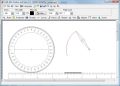
Draw with dividers, ruler, protractor, pencil and rubber on the screen as you would do it on a sheet of paper. You see a real ruler on the screen which you can move and rotate. You can then draw along the ruler. If you want to make constructions on the computer this is the easiest way.
Requisitos do Sistema:
Windows 98, 2000, XP, Vista, 64bit
Publicado por:
CAD-KAS Kassler Computersoftware GbRPágina Oficial:
http://www.cadkas.com/dividers-and-ruler.phpTamanho do arquivo:
695 KB
Preço:
$79
Títulos em Destaque
Edite arquivos PDF já! Você pode fazer anotações, adicionar texto, mudar o texto (corrigir erros de gramática, atualizar números de telefone...) ou deletar palavras. Adicione ou delete fotos, gráficos vetoriais e adicione texto em qualquer fonte que desejar! Selecione, mova, copie e cole texto, fotos ou objetos gráficos usando ferramentas.
ofertas de hoje de iPhones »





Comentáriosrios do Dividers and Ruler 1.0
Please add a comment explaining the reason behind your vote.
As a draughtsman, here’s a bit of advice to the developer. I hope it helps. Good basic start but why is there no help or guidance (or I cant find it)? For instance what does page count do? I gave up trying to find out! Why can’t I lock on to strategic points, ie if I draw a circle, then move it or the dividers for some reason, how do I get the ruler to go through the centre of the circle? On real paper the dividers would have, at least made a dot at the centre of the circle? So, at the moment, to use this accurately, as a draughtsman would, you have to plan well ahead and use the panel for numeric values noting all coordinates as you go along. I’m used to using much more sophistication (ie Autocad etc) so to make this less disappointing you need to consult a draughtsman and add a few more basic features.
Save | Cancel
The good:
Very small file size.
Ruler can be changed from inch to millimeter. If you can find where.Go to view and select the system you prefer.
Drawing can be saved as picture.
The BAD:
Very very basic program!
$79.00 are they out for a quick buck??
Haven't found out how to draw a straight line.
If I draw a line on paper, I place the pencil on the ruler and draw then it's straight. Here it's like freehand drawing.
Drawing can be saved as picture, ... BMP only.
Verdict:
It's a sub basic freehand drawing program with some useless stuff on the sheet.
If I would write my comments in German, it wouldn't be that nice.
Save | Cancel
Once I figured out how to use it (no help, the 'manual' was a readme), I can see some slight use for it, particularly the angles, although the direction of the degrees in the protractor seem backward to me.
I find it too cumbersome to draw with. I will stick with the infinitely more usable (though equally strange) portable, tiny, and freeware EVE (Embedded Vector Editor), which I still use mroe than any other graphics program.
Save | Cancel
I would be giving Dividers and Ruler a two thumbs up if not for the fact that it only saves with a .ZIR extension that I can't open in any other image program. There are a lot of nice features for detailed measurements and angles but not in a format I can use.
Save | Cancel
I create a lot of graphics and photo manipulations and often need to grab a protractor (which many graphics programmes don't easily have to hand). Usually I use the free bit of Iconico's Screen Caliper. But it does have a few limitations.
I like the protractor in Dividers and Ruler 1.0 but unfortunately it doesn't seem to work directly with other graphics programmes e.g. to draw angles with Paint, nor does it allow you to copy and paste into other applications (but it does export/save nicely).
This is good to have for free (thanks GAOTD) and I'd happily pay $10 to $15 for a programme like this but $79? I don't think so!
Save | Cancel