Todos os dias oferecemos software com licenças GRATUITAS que do contrário você teria que comprar!
Giveaway of the day — Macgo Windows Blu-ray Player 2.10.3
Macgo Windows Blu-ray Player 2.10.3 esteve disponível como oferta em 8 de junho de 2014
Macgo Windows Blu-ray player é um excelente player de Blu-ray para Windows. Ele pode reproduzir discos de Blu-ray, arquivos ISO em Blu-ray, e pastas (BDMV) em Blu-ray em todos os sistemas operacionais do Windows, mesmo no Windows 8.1. Além dos formatos de mídia em Blu-ray, DVDs e outros formatos também podem ser reproduzidos com ele.
Além do mais, ele pode magicamente reproduzir Blu-ray no iPhone/iPad/iPad mini/iTouch. De alta tecnologia e diversidade funcional, o Macgo Windows Blu-ray Player irá lhe transportar para o paraíso do Windows Blu-ray.
Desconto especial de 50% para usuários do GOTD no cupom de código: 50CPGOTD
Requisitos do Sistema:
Windows 8.1, 8, 7, Vista and XP (SP2 or later); Intel Core2 Duo 2.4GHz processor or equivalent AMD Athlon processor or higher recommended; 512 MB RAM or higher recommended; 250 MB of free disk space; An internal or external Blu-ray drive
Publicado por:
Macgo InternationalPágina Oficial:
http://www.macblurayplayer.com/windows-bluray-player.htmTamanho do arquivo:
47.4 MB
Preço:
$59.95
Títulos em Destaque
Mac Blu-ray Player is the first universal Blu-ray media player software for Apple Mac, which can successfully play Blu-ray Disc, Blu-ray ISO files, or Blu-ray folders on Mac and PC, as well as on iOS devices, such as iPhone / iPad / iPad mini / iPod touch (iTouch). Almost all kinds of video, audio, photo formats can be played with it.
All-in-one iPhone data recovery that can get back photos, contacts, messages and call history you lost for iPhone styles on Mac platform. User-friendly operation and delicate features make a perfect iPhone data recovery process on Mac OS.

Whenever you found your iPhone running slow or running out of space, you can ask help from iPhone Cleaner for Mac. It give a effective solution to clean up your device and reclaim the lost space to speed up your iPhone and get more apps, music, movies, photos.
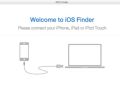
Macgo iPhone Explorer for mac is a free iOS file explore software, it is designed to access, explore and manage your iOS file system with or without jailbreaking. With the freeware, you can easily add and delete all types of file saved on your iOS devices.
GIVEAWAY download basket




ofertas de hoje de iPhones »





Comentáriosrios do Macgo Windows Blu-ray Player 2.10.3
Please add a comment explaining the reason behind your vote.
Message from Macgo Software:
Installation and Registration:
1. Unzip the package you've downloaded and install the software;
2. Run the software you installed;
3. No activation, this version is special customization for GOTD users and you don't need to activate it any more;
Note: Macgo provides 50% off coupon code: 50CPGOTD (apply to All Macgo products http://www.macblurayplayer.com) for all GOTD users. Valid time: June 8th – June 23th
More tips:
How to Play Blu-ray on Windows?
For all giveaway users, Macgo also provides Macgo iPhone Cleaner for Mac, with which you can clean junks, apps, caches from you iOS devices on your Mac.
Is it incredible? Now you can enjoy it for free to June 30th.
Hope you like this offer and like our Facebook https://www.facebook.com/MacBlurayPlayer for more informaiton. Any suggestions on our software are welcomed. :D
Sincerely,
Macgo Support Team
Save | Cancel
Blu-ray menu Message from Macgo Software:
@4-JackS: Thanks so much for your interest in our software.
Referring to your issue about Blu-ray menu function, I'm sorry to tell you that this function is only available on Mac version at the present time. We will release it on Win version once Blu-ray menu function is more stable and reliable on Mac.
If you are interested on it, you can have a try on Macgo Mac version.
Save | Cancel
I only used this one to play a BD, i'm using it on my PC and Blu-ray movies watches not bad. The audio's nice, too. It plays Blu-ray ISO files, that is good for me.
Save | Cancel
Macgo Windows Blu-ray Player ==> 60 BUCKS and not updatable for FREE!
DAP PLAYER ==> FREE and always updatable for FREE!
http://www.winxdvd.com/resource/free-blu-ray-player.htm
Just to say!!
Save | Cancel
If it helps...
When you want to watch non-free video, e.g. Netflix or Amazon or retail video DVDs & Blu-Ray etc. you have to deal with DRM. With video DVDs & Blu-Ray, the organizations behind each would like anyone making players to pay them a license fee, & in return they get access to at least some of what they need to work with the DRM -- I believe some of the protections that may be used require their own licensing fees. That's one reason why stand-alone Blu-Ray players, while they've come down in price, still aren't cheap.
Retail video Blu-Ray discs also use Java -- it controls how the discs work in players, makes the menus & many special features work, and often includes separate DRM. However video Blu-Ray discs do not have to include Java -- any video Blu-Rays you create will use something similar to what you find on DVDs instead [some of the software used for Java menus & such on Blu-Ray video discs cost more than a cheap car].
If software can successfully bypass the DRM, the Java portions may or may not work. Some players or decrypting apps [e.g. AnyDVD HD] can try to show you simplified menus rather than those using Java. For that Java to work it often has to be burned to a BD disc or the disc's ISO mounted in a virtual drive, because it's written to work off a disc in a drive [on a PC with its own drive letter], & not in a folder on some HDD.
That said, if you want to play most retail video Blu-Ray discs on you PC *the same as a stand-alone player*, buy something like PowerDVD Ultimate -- they seem to have lowered the price to around $100. Nero Ultimate includes a licensed Blu-Ray player, but MSRP is $100+ I believe. There are other retail players, e.g. Corel's WinDVD, but I haven't had much success with them on my system, but then I've got a lot of other video stuff that may be incompatible with them. I have older versions of PowerDVD, Nero, & a Roxio player that will not play the latest video Blu-Rays because they are no longer updated to handle new DRM -- you can't just buy one of those & expect it to play every disc you'll ever rent or buy forever.
Players like Macgo Windows Blu-Ray player [or similar from other companies] are often available with lifetime licenses, & when that's available that's a plus. There is a [usually small] gamble that because most don't pay the licensing fees so they can keep costs lower, they will not play every disc, at least right away when it 1st comes out... I watch videohelp.com for daily software updates, & notice that when decrypters are updated they frequently cite new DRM protections, so it's fair to assume there's a bit of cat & mouse going on, where it takes awhile before new DRM is mastered.
Most of these players are based on XNMC [XBMC.org]
"XBMC Media Center is an award-winning free and open source cross-platform software media player and entertainment hub for digital media for HTPCs (Home theater PCs). It uses a 10-foot user interface designed to be a media player for the living-room, using a remote control as the primary input device. Its graphical user interface (GUI) allows the user to easily browse and view videos, photos, podcasts, and music from a harddrive, optical disc, local network, and the internet using only a few buttons. The XBMC project is managed by the non-profit XBMC Foundation, and developed by volunteers located around the world. Since its creation in 2003 more than 60 software developers have contributed to XBMC, and 100-plus translators have worked to expand its reach, making it available in more than 60 languages. "
.
That's not a bad thing since smaller companies could not rival the work put into XBMC, & XBMC itself cannot handle the decryption end of things. However that also means that these players share any & all of XBMC's maybe weaknesses, such as not having working Blu-Ray video Java menus, or 3d Video Blu-Ray support. If you want to know more about what one of these players can/can't do, Google your question for XBMC, e.g. XBMC 3D Blu-Ray.
How does player X compare to player Y if they're both based on XBMC? It's not that different from the many converters based on ffmpeg, where in theory they're all the same thing but some perform better, & people like some brands better. A big part of it is individual tastes, regarding the GUI & the way things work -- another big part is how it performs on *Your* machine(s). And finally, is it a company that's going to be around to provide support in the future? Most phone home for directions on managing specific DRM. Macgo's site says they've been at this 10 years.
Save | Cancel