Todos os dias oferecemos software com licenças GRATUITAS que do contrário você teria que comprar!
Giveaway of the day — Icepine Video Converter Pro
Icepine Video Converter Pro esteve disponível como oferta em 13 de dezembro de 2009
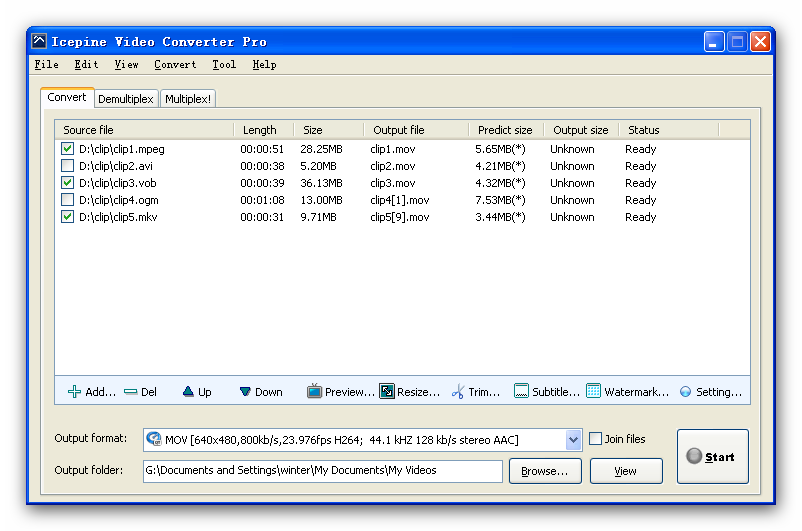

Icepine Video Converter Pro é uma ferramenta poderosa e fácil de usar para converter entre os principais formatos de áudio e video.
Principais Recursos:
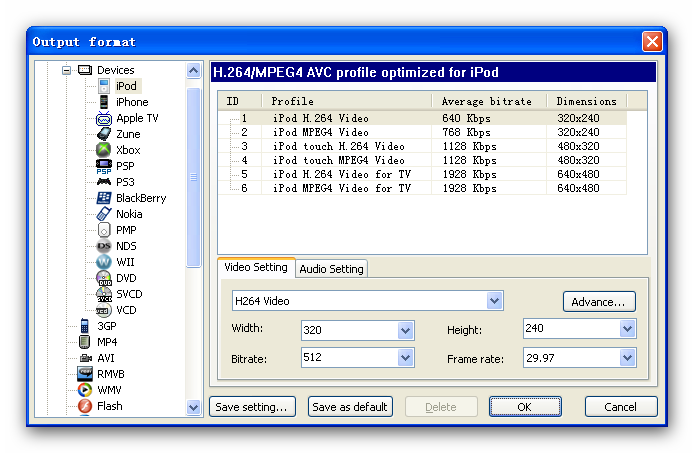
- Converta video para iPod, iPhone, Apple TV, PSP, PS3, Xbox, VCD, DVD, celulares, MP4 players e etc. em apenas alguns cliques.
- Converta para todos os formatos mais populares com alta qualidade. Suporte ao converter videos em HD incluindo H.264/AVC, AVCHD, MKV, TS, e etc.
- Arquivos de video demultiplex e multiplex.
- Converta e grave DVD, SVCD, VCD.
- Junte arquivos de video.
- Apare arquivos de video.
- Edite video e audio, suporta colocação de legendas, efeitos de marca d´água, ajuste de níveis, redimensionamento de video, equalização e aprimoramento do áudio.
- Transfira arquivos de video convertidos para PSP, iTunes.
- Extraia trilhas sonoraa e imagens para o seu video.
Requisitos do Sistema:
Windows XP (SP2 or later), Server 2003, Vista, Windows 7
Publicado por:
Icepine SystemsPágina Oficial:
http://www.icepine.com/index.htmTamanho do arquivo:
9.04 MB
Preço:
$25.95
GIVEAWAY download basket




Comentáriosrios do Icepine Video Converter Pro
Please add a comment explaining the reason behind your vote.

These converters are two a penny, and mostly free but I will give anything a try. This is a little different from the others in that it has demultiplex/multiplex (which apparently only works on avi files?).
So, I chose a clip of one and half minutes and first of all de-multiplexed it, which means separating the audio and video. Well, no choice of formats! But it worked.
Next, put it back together (multiplex). Again, only goes back as an avi! It should have been identical to the original, and it was as far as I could see and hear although the file size was a few bytes less. So far so good!
Now to convert it - I tried mpeg4 but it didn't like that - so mpeg1 was attempted. Seemed to have a few brief stops during the conversion, probably memory problems, but it completed successfully.
Finally, play the end result!
Oh dear, the audio is a whopping nine seconds ahead of the video! I've never had that bad audio/video sync before! However, quality is good.
Looks like a work in progress to me. I hope the developers will also change the general layout because a number of "features" simply were not easily visible. I will stay with the free stuff for now.

The Good
* Supports audio and video conversions.
* Supports many input and output formats.
* Supports output profiles for various electronic devices.
* Supports the ability to do stream copies.
* Has abilty to mux and demux.
* Has built in PSP transfer-er and DVD/SVCD/VCD burner.
* Can do various video including but limited to watermarks, trimming, and adding effects.
* Can do various audio edits including but not limited to trimming, and adding effects.
* Gives user large freedoms in terms of selecting codecs to use.
The Bad
* An error window pops up when trying to set video height and width as "original" for some output formats.
Free Alternatives
iWisoft Video Converter
FormatFacotory
For final verdict, recommendations, and full review please click here.
PROS:
* Downloaded, installed, activated fine on Vista x64 OS.
* Activation "activate.exe" file must be run before opening program.
* Registration is successfully displayed in program.
* Detailed, complete local Help File provided within program.
* support email address provided in Help File.
* GUI is simple, clear, easy-to-navigate, easy-to-understand.
* supports numerous input/output video & audio formats.
* Program may be installed on 2 computers, as long as user operates only 1 instance of the program on 1 PC at a time.
* supports drag-and-drop for source video/audio files.
* allows for multi-plexing and de-multiplexing.
* allows for preview of source file.
* supports subtitles.
* fairly easy and simple to use - i.e., low learning curve.
CONS:
* window may not be maximized or re-sized.
* video input format (moonshell DPG) not supported.
* video output formats (AVCHD, DV, OGM, Matroska MKV) not supported.
* audio output formats (CDA, other playable in WMP) not supported.
* subtitles (DVD, SRT, SSA, ASS, VOBSUB (IDX/SUB)) are not supported.
SUMMARY: - Strengths outweigh weaknesses. Program is definitely a keeper. Thumbs up. Thanks, GOTD & Icepine Systems.
FREEWARE OPTIONS:
HandBrake
Super
MediaCoder
There are a lot of video converters, & most are based on collections of the same free-ware &/or open-source code -- question is what does Icepine Video Converter Pro offer that others don't? To answer that question...
It doesn't have a skinned (stylized) program window [GUI], which to some is a plus. The window can't be re-sized, which is becoming so common, even on apps costing 3X as much, that I've stopped counting that as a con. While the program's exe file shows version 2, it could (& should) benefit from further development, in general making things easier to find & [much] more intuitive. And while it does have a help file to show you how to use the app, it doesn't have word-wrap on [viewed in XP], & the spell-checker was apparently off when it was written [not a huge deal, but so simple to correct/avoid, I have to wonder why it wasn't].
Icepine Video Converter Pro works at roughly average speed [compared to other video converters], though in XP it uses more of your CPU, at ~47% with a quad vs. the usual ~25% [25% usually indicates just one core]... Using more of your PC/laptop's CPU is a good thing, as long as it makes converting faster. It offers a few video filters, though if you really want/need to use filtering to improve the quality of your video, you're *MUCH* better off using VirtualDub &/or AviSynth [both free]. You can trim the length of your imported video clips, but doing so is a bit awkward -- you use times rather than the far easier dragging or inserting in/out markers with a video preview. Previewing itself is handled by Windows' Media Player, which is a definite Con -- wmplayer simply cannot handle enough of the formats you might use. Icepine Video Converter Pro has quite a few templates that are stored in .ini files rather than the usual .xml -- this *might* make editing/fine tuning those templates easier. Beyond the templates you can make most settings manually as well, but it would be Very nice if you could set peak as well as average bit rates [right now you can only set average, which is 1/2 or 1/3 of what you need with variable bit rate encoding].
Icepine Video Converter Pro does handle subtitles, but I'm not sure how handy that is... Many DVD ripper/converters will add permanent subs [they're basically pasted on top of the video & then encoded that way], but I've always wondered who can read them when watching [often tiny] video on a hand-held player?
[Otherwise if subs are important to you: there is no standard way of handling subs outside of video DVDs -- MKV comes closest *with the right software*, followed by DivX, & some special mp4 type codecs (Nero Digital for example) display embedded subs when using *their* player. Windows Media may be the easiest to use with/for switchable (on/off) subs, followed by Real, but both require special software & methods to set-up that unfortunately almost no one uses. Flash video is the most difficult, & expensive (i.e. software required) format to add subs to, though YouTube is trying to help there.]
In the help file the developer notes that DivX is the default encoder, rather than the usual [& free] Xvid -- if you want to watch video converted to DivX there is a free version of the codec, but you might be better off setting up Xvid to handle the task... Xvid is more common, has much less impact on your Windows install, & since it's free, you don't have to worry about feature-limited versions. And Xvid normally takes the place of DivX quite nicely, even on/in DVD players that handle the format.
Digging a bit deeper into the tech aspects, Icepine Video Converter Pro is nice in being self-contained, with very few registry entries... Often suggested alternatives including Handbrake, Format Factory, Super, MediaCoder etc Are Not! Depending on what else you have installed (or may want to install) they can easily cost you an all-nighter trying to get things working again. You can find several alternatives at videohelp.com -- don't know if it's still available (live), but yesterday Asraf's & other sites detailed how to get (the older) version 7 of Cyberlink's suite for free -- WinX_HD_Video_Converter & Fast_Video_Converter [appear to be the same app] have both often been available for free lately, & the latest version seems to work quite nicely, with a bit of a speed boost too -- if you run an ATI graphics chip/card, check out their CCC converter, as well as A's Video Converter, which make use of the GPU to get often incredibly fast conversions [in win7 64 I've (briefly) hit (reported) 800 fps encoding 720 x 480 mpg2 to 320 x 240 wmv].
It looks like it doesn't regognize .flv files at all.
ofertas de hoje de iPhones »





Gostaria que reeditassem o giveaway desse software, pois é o único que tem suporte para dois áudios. Obrigado.
Save | Cancel