Todos os dias oferecemos software com licenças GRATUITAS que do contrário você teria que comprar!
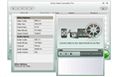
Giveaway of the day — Extra Video Converter Pro
Extra Video Converter Pro esteve disponível como oferta em 30 de agosto de 2009

Incrivelmente fácil de ser usado por iniciantes e avançados, o Extra Video Converter Pro é um poderoso conversor e divisor de video universal, que converte arquivos de videos para os formatos mais populares. Com este software, você pode converter arquivos para AVI, WMV, MPEG, MPG, MP4, MOV, DV, H.264, 3GP, etc., que são suportados por iPod, Zune, iPhone, Apple TV, PSP, Creative Zen, Pocket PC, Mobile Phone, Xbox 360, PDA, etc.
Extra Video Converter Pro é um dos conversores de video multi-formato mais estáveis disponíveis no mercado atualmente. Apenas adicione os arquivos que você deseja converter para a lista, selecione o formato que deseja usar e clique o botão de converter.
Requisitos do Sistema:
Windows Vista, XP, NT, 2003, 2000, 98, 95
Publicado por:
Extra Software, IncPágina Oficial:
http://www.dvdcopyrip.com/extra-video-converter-pro.htmlTamanho do arquivo:
37.3 MB
Preço:
$34.95
Títulos em Destaque

Extra DVD Ripper Express é um programa ripador de DVD flexível e fácil de usar, que permite que você converta filmes em DVD para arquivos AVI, DIVX, XVID, VCD, SVCD, MPEG, iPod(MP4), iPhone, Apple TV, FLV(YouTube), Sony PSP, Sony PS3, WMV, Microsoft Zune Player para WMV e MP4 Video (including Pocket PC e Mobile 3GP) sem qualquer perda na qualidade.

Extra DVD Copy é um programa de cópia fléxivel e fácild e usar. Seu design intuitivo possibilita que você faça o backup do DVD em um clique. O Extra DVD Copy pode copiar a maior parte de tipos de filme DVD-5/DVD-9 DVD para DVD-9 (Dual Layer) ou discos de DVD-5 sem perda de qualidade .

Extra Video Converter é um video-conversor poderoso e universal que converte todos os formatos populares como AVI, DIVX, XVID, MPEG, MPG, WMV, ASF, RM, RMVB, DAT, MOV, SWF, FLV, VOB, and NSV to AVI, MPEG, Apple iPod, Sony PSP, Mobile 3gp, Microsoft Zune, WMV, YouTube, FLV, MOV, MP3, WMV, OGG, ou WAV).
Extra Screen Capture Pro é um programa de gravação de tela leve, fácil de usar e extremamente poderoso. Consegue capturar atividades e sons da para AVI video file or EXE file.
Extra DVD to iPod Ripper Express é um software ripador de DVD flexível e fácil de usar que pode rapidamente converter filmes em DVD para Apple iPod (MP4) sem perda de qualidade. Extra DVD to iPod Ripper Express permite que você monitore o video enquanto ripa em alta velocidade. A qualidade vai te ipressionar!
GIVEAWAY download basket




Comentáriosrios do Extra Video Converter Pro
Please add a comment explaining the reason behind your vote.

Good morning everyone,
PROS:
*** Smooth download/installation/activation/registration on Vista Home Premium X64 SP2 system.
*** Registration information successfully shows up in the About section.
*** Smooth/Easy program access without needing to use Run As Administrator privilege feature.
*** Simple, clean, intuitive, easy-to-understand, easy-to-navigate Graphical User Interface (GUI).
*** No distracting developer advertising for other paid programs listed on the program's main screen.
*** Supports conversion formats of: AVI, MPEG, IPOD, IPHONE, Portal Device, YouTube FLV, PSP PS3, Blackberry, WMV, Microsoft Zune, Pocket PC, Mobile 3GP, Real Media, Audio, and a "customize setting" for each of these conversion options.
*** For each option, the user may select desired: Video Options (Video Codec, Video Size, Frame Rate, Video Bitrate, Aspect Ratio), and Audio Options (Audio Codec, Audio Bitrate, Channel, Audio Sample, Audio Volume).
*** User can determine/choose folder location for resulting converted output.
*** Program offers a nice preview pane to view conversion process/output.
ACTUAL PROGRAM OPERATION:
I successfully converted a 1.65MB WMV video to an MPEG video instaneously. The conversion was immediate (literally within seconds).
CONS:
*** GUI is drab and visually unappealing (could use a bit more sprucing up, in my humble opinion (IMHO).)
*** settings pop-up side-menu display is misleading - as the user may think that he/she can change the audio/video options from within this window, which is not the case. Settings may be changed only via the program's main-screen scrolling-arrow settings menu.
*** Help Guidance is provided online only, and not within program itself.
*** Setup error occurred during installation (something about memory size???) - this did not, however, affect final installation or program performance, and maybe this is unique only to my computer situation (I'm not sure).
*** Register menu still indicates program is unregistered.
*** Minor spelling errors (quality control process should be implemented to eliminate these mistakes).
SUMMARY:
Despite minor weaknesses noted above, this program does what it says it will do. Thus, a two-thumbs-up for today's GiveAway. Thanks, GOTD and Extra.
100% FREEWARE OPTIONS (for those who miss today's offer):
1. Media Coder.
2. Hand Brake.

Bleh. Wasn't anticipating today's original giveaway (Advanced Registry Doctor Pro) would be pulled because of registration issues so I do not have a review for today's new giveaway (Extra Video Converter Pro). However I did give it a quick look over and I see no reason why me, or anyone, would want to use it over FormatFactory.
Extra Video Converter Pro is a step up from the Extra Video Converter [without the Pro] featured on GOTD not too long ago. Gone is the playful interface, replaced by a GUI that's all business. Also gone is the relatively small program size, as the program's folder grew from 11 MB to 120.
Extra Video Converter Pro brings together a lot of separate apps &/or code libraries, like most of the converters found at videohelp.com, including the popular Super & Format Factory. I think it's easier for a novice to use, with more integration & format presets, but that's strictly my opinion. By using all these separate apps, you get the benefit of a lot of specialized, highly focused software development, that would be difficult if not impossible to duplicate in-house. The downside, & it is a pretty big one, is that you risk conflict with other software doing the same thing. [That's why I use a modified install of Super, & don't use Format Factory myself]
Video software handling in Windows is a bit weak to start with, & when the same programs are installed in more than 1 place, other programs & Windows itself easily become confused over which one to use... The more correct way to do things is to install software like your codecs separately, so there's only 1 copy for everything else to use. Extra Video Converter Pro, like Super & Format Factory want to save you the hassle of these individual downloads & installations, so they each bundle individual apps & code in their packaging. By doing this Extra Video Converter Pro might conflict with Quicktime, Real, ffdshow, AC3 filter, Xvid, 3ivx & more, whether you had them installed individually or as part of another package. If all you install is one of these conversion apps, you probably won't have a problem. If you re-install the individual apps, again likely no prob. If you want to run more than 1 conversion app, & both use the same stuff, your odds of success go down. If you remove Extra Video Converter Pro, there's a decent chance your other video software might stop working properly, because Windows has been set to look for these components in the Converter Pro folder, & now it's missing.
Extra Video Converter Pro's window or GUI is pretty straightforward -- not a lot of help or hand-holding needed. You add your video [it will accept DVD VOB files - re-author in Shrink to get 1 VOB], & set your output folder. Then (from the left) select output file type [avi, MPEG, iPod etc], & choose a pre-set -- choosing "Customize setting" or clicking the Setting button opens a dialog that lets you set things like bit rate & fps... unfortunately choices for aspect -- i.e. 4:3, 16:9 etc -- are weak, & the only codec for avi is a very limited setting for Xvid. In the upper right hand corner is an oval icon or button that opens another dialog for preview. On my PC it didn't always show a video window, depending on the kind of file imported, but more importantly you'll see two oval sliders on the video progress bar... drag those to set the start/stop times [when you want your video to start & end]. This works well if you want to start at or very near the beginning of a video, but when set further in it causes a loooong delay as Converter Pro works it's way through the video to get to that point. The big round button obviously starts/stops conversion. Clicking the "!" button in the lower left corner shows you the About box, including your GOTD registration.
Conversion speed is towards the better end of Good -- if you have an ATI graphics card with ATI's Avivo installed [or the nvidia equivalent] there's no comparison to using stream processing, but you don't have nearly as many output settings as the Converter Pro. Quality is a good balance -- you can have highest quality, or speed, but not both, so developers of apps like this always have to compromise... if you want higher quality, use VirtualDub & use multiple encoding passes.
All in all I'd recommend Extra Video Converter Pro if that's all you're going to use, or if you want & can deal with things like the bundled ffdshow, Quicktime etc. If you are building a video toolbox, & don't want (or know how) to deal with these potential conflicts, I'd suggest staying away from this, or Super, or Format Factory.
@1 agent001- I think you may have missed the entire purpose of this site. We aren't wasting any money, since the offer is FREE today. The POINT of posting here is to tell us your experience with the offer of the day. Try reading @6 Happy Person's review for the way to format your post. If AFTER your review, you want offer your opinions on better/similar freeware/paid sofware, then have at it!
And yes, I realize I haven't given my opinion of the day's giveaway. I'm just about to test the prog, and will post a review soon. It just bugs the crap out of me that some folks don't bother to utilize the site as intended before shoving other (tricky download?) progs in front of us. And in this case, you didn't really even bother to compare apples (GOTD) to oranges (whatever the heck that was you recommended). *raspberries*
1. Good - Install good on XP Media Center Edition 2002 with SP 3.
2. Not Good - Update the system files.
3. Not Good – Difficulty to paste name and registration code.
4. Good - Converted files are with very good quality!
5. Not Good - HD QT .mov format to .avi format you do not have HD option you have (frame ratio) 640x480 or 320x240 pix. It will change the ratio of the frame and everything will look very funny even in Settings is chosen Aspect ratio Original.
6. Good - Conversation to MPEG if it is MPEG2 Super Video CD – NTS Mode for North America frame ratio is good and quality high
7. Not Good Name of the source and converted files has to be the same, can not be changed.
8. Not Good – Settings do not give you chase to change too many parameters.
9. Not Good – Step by Step Guide in the website do not tell you that the codec and parameters have to be selected from pop-down menus not through window setting. Only On-line not too good help.
10. Good – Very fast converter.
11. Not Good - The preview screen is showing you only file which will be converted.
In general can be used by hobbyists. Do not advice to buy full license even if you are semi pro will be disappointed.
ofertas de hoje de iPhones »





Installation under MSVista is not completing. After installation, the software starts to unpack some other files (after registering files), and I got an error message at the end, as follows:
"Not enough storage is available do process this command. Installation did not complete.
This is just one more case of GAOTD software I can't install.
I'm sick and tired of all the software I can't make work as expected.
I'm about to give up from you.
Save | Cancel